
Splitwise
SplitwiseFinance
4.17.65K Reviews
- Version
- 26.8.2
- Installs
- 10.00M
- Age Rating
- Everyone
Screenshots
Our Review of Splitwise
 Analysis by Appyee
When I share costs with other people, the awkward part is rarely the arithmetic; it is keeping track of the details without making anyone feel chased. Splitwise gives those expenses a shared place, which can make a weekend away, a household budget, or a run of group dinners easier to manage. I find it most useful when several people pay at different times and everyone needs a clear record of what is owed.
Reading the numbers and finding your way around
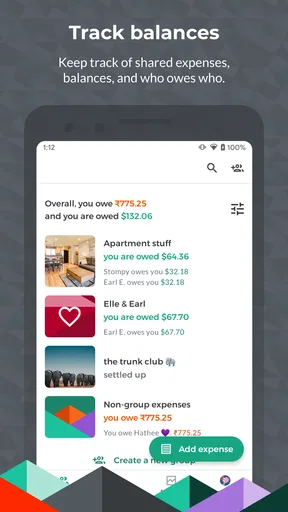
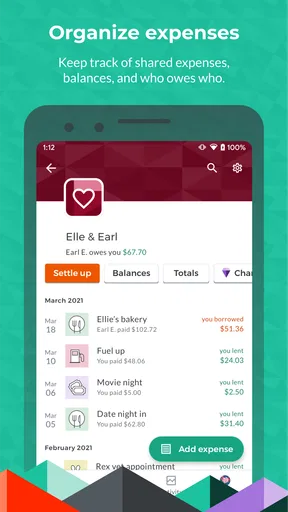
The core task is straightforward: record an expense, identify who paid, and choose who should share it. That simple sequence matters for people who do not want to maintain a complicated spreadsheet or work out each person’s portion by hand. The app’s finance focus is practical rather than flashy, and its expense history gives a group something concrete to refer to when memories of who covered lunch start to blur.
It is still worth entering each charge carefully. Before saving, I would check the amount, payer, and participants, especially when not everyone shared the same meal or activity. A clear note can explain an unusual split later, while a vague entry may leave friends guessing. Accuracy at the point of entry is what makes the record useful; an app cannot resolve a disagreement if the original details are wrong.
Different abilities, different ways of using it
Expense tracking is a low-pressure use of a phone compared with tasks that demand fast reactions, but it still involves reading amounts, navigating controls, and entering details. I would not assume that every person finds the same interface comfortable. Someone who prefers larger text, uses assistive settings, or has difficulty with precise touch input should try a small shared expense first and see whether the current version works well with their device settings.
There is also a social side to accessibility. A group member may not want to create an account or manage another app, while someone else may prefer seeing every shared cost recorded. Agreeing on a simple routine helps: decide who will enter expenses, what notes to include, and how the group will confirm a split. That keeps the process from becoming a new burden for the person who is least comfortable with phone-based bookkeeping.
When access depends on the situation
For a trip, recording costs as they happen is usually more reliable than reconstructing them at the end. One person might add the grocery bill, another the taxi, and the group can check the running picture before the final day. With a roommate, the same habit can turn recurring household costs into a record that is easier to revisit than scattered messages. These workflows are especially helpful when people take turns paying rather than transferring money after every purchase.
Groups are useful when expenses belong to a shared event, while individual tracking suits a recurring arrangement between two people. I would keep those contexts separate instead of putting every cost into one sprawling group: a trip has a natural end, whereas rent-related or household spending continues. That small organizational choice makes old entries easier to interpret and reduces the chance of mixing unrelated obligations.
Using Splitwise for shared costs
Splitwise is a free finance app from developer Splitwise, with optional in-app purchases. It is rated for Everyone, has an average rating of 4.2 from around 189,000 ratings, and has been installed over 10 million times. It first appeared on September 12, 2011, and version 26.2.2 is listed for devices running Android 9 or later. Those details put it in the familiar category of practical money-management tools, but the best reason to consider it is its focus on keeping shared expenses organized.
Getting Started with Splitwise
First things first, setting up Splitwise is a breeze. You can download it from the App Store or Google Play, and it’s free with optional in-app purchases. Once you fire it up, you’ll be greeted with a clean, user-friendly interface that's super intuitive. Creating an account is straightforward—you can sign up using your email or link it directly to your Google or Facebook account. Easy peasy!
For a new group, I would establish the basics before adding a pile of costs: who belongs, what the group is for, and whether a particular expense is shared by everyone. This is a useful habit when a trip includes couples, children, or friends who join for only part of it. It avoids treating “the group” as if every person took part in every purchase, and it gives anyone reviewing the list a better chance of understanding the split.
Adding Expenses
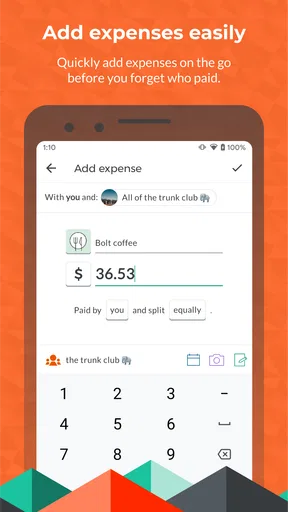
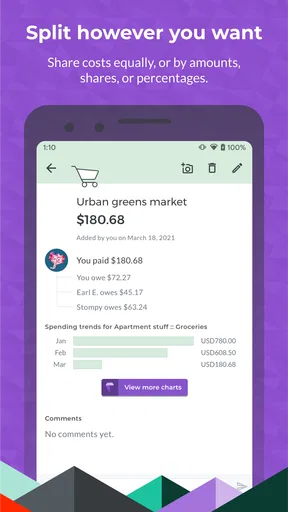
After setting up, you can start adding expenses right away. Whether it's splitting a dinner bill, a vacation, or even household expenses, Splitwise has got you covered. You just input the total amount, select who paid, and indicate who should split the cost. The app will do all the math for you, which is a huge relief for those of us who are mathematically challenged!
You can also add details to each expense, like the currency used, date, and any notes or images if needed. This is especially handy if you need to remember why you paid for everyone’s triple scoop ice creams last weekend.
One helpful workflow is to enter a cost while the receipt or payment is still fresh, then add a short explanation for anything that might look odd later. For example, a shared grocery shop could include both group snacks and personal items; a note can clarify why the split is not even. I would not rely on a photo alone to explain that distinction. A brief written note is easier for everyone to scan when checking the balance.
There is a trade-off between detail and effort. Logging every small purchase gives the most complete picture, but it can make a casual outing feel like bookkeeping. For a short dinner, a single well-described entry may be enough; for a longer trip, separate entries make it easier to correct one mistaken amount without untangling the whole account. I would choose a level of detail the group can maintain consistently.
Groups and Friends
One of the coolest features is the ability to create groups. If you’re on a trip with friends, you can create a group and add everyone involved. This way, all expenses related to that group are neatly organized in one place. Plus, you can invite friends to join your group via email or a unique link. This makes it super simple to get everyone on board and ensure all accounts are settled.
Splitwise also lets you manage individual expenses with friends who aren’t in a group. So, if you and your roommate are splitting the electric bill, you can track that separately. I love how flexible and accommodating it is!
The choice between a group and a friend-to-friend record is more than cosmetic. A group gives a temporary project—such as a holiday or shared event—a home of its own. Individual tracking is less cumbersome when the same two people exchange costs over time. If a group is no longer active, it is sensible to settle and close out its obligations rather than continuing to add unrelated purchases to it.
It also helps to agree on who is responsible for adding expenses. If everyone records their own payments, the account may be more complete, but only if the group avoids entering the same bill twice. If one person handles entries, the process is simpler, though that person needs timely details from everyone else. I would pick the approach that fits the group rather than assuming one method works for all.
Settling Up
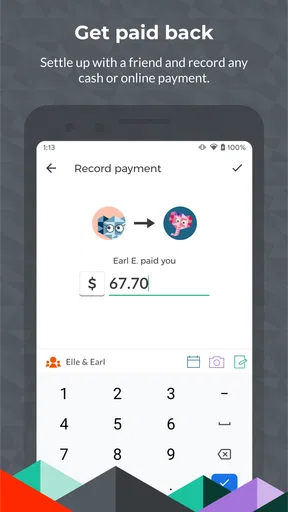
Now, here’s where Splitwise shines. When it's time to settle up, the app offers clear instructions on who owes whom and how much. You can choose to pay via PayPal or Venmo directly through the app, or just settle in cash. The app even sends reminders, so you won’t forget to pay your buddy back for those concert tickets.
And for those of you who love stats, Splitwise offers an overview of your spending habits. You can see how much you spend with each friend or group, which can be eye-opening (and maybe a little terrifying!).
A balance is a record of what the group has entered, not proof that a payment has actually happened. When someone pays outside the app, I would make sure the group records or acknowledges that settlement so the displayed picture stays useful. This distinction is important for cash payments in particular: the people involved may know the debt is settled even if the shared record has not caught up.
Compared with a notes app or a shared spreadsheet, Splitwise takes care of the arithmetic and keeps expenses tied to friends or groups, so it is less work when costs keep accumulating. A spreadsheet may suit people who want custom columns or a budget built around many categories. A quick bank transfer is simpler for one uncomplicated bill, but it does not by itself preserve a shared history of who paid for what. I see Splitwise as the middle ground: more structure than messages, less setup than building your own ledger.
Where it can feel less convenient
Not everyone wants shared spending to become a running account. If your group settles immediately after each purchase, a quick transfer and a short message may be all you need. The app is also less appealing if friends are unwilling to join or keep their entries up to date; a shared record only works when the people involved cooperate. In those cases, one person might track the costs and share a summary, but that adds a job rather than removing one.
The optional purchases are another consideration. The app is free to start, while in-app items range from $0.99 to $59.99 per item. I would begin with the free experience and decide whether extra capabilities solve a real problem in your routine before spending. Features such as receipt scanning, currency conversion, and more detailed expense reports are associated with the Pro version, but occasional users may have no reason to pay for them.
There is a human limitation too: a tidy balance does not make an uncomfortable conversation disappear. If someone disputes whether an expense was shared, the group still needs to agree on what is fair. I find the app most helpful when people settle those expectations early and use entries as a neutral record, rather than treating reminders as a substitute for a friendly conversation.
Who I would recommend it to
I would recommend Splitwise to roommates, travel groups, couples who regularly share costs, and friends who take turns paying. It is particularly useful when expenses happen over several days and no one wants to calculate the final balance from memory. It is less compelling for a person who rarely shares purchases, for a group that prefers to settle every bill on the spot, or for anyone who needs a highly customized household budget rather than a shared-expense tracker.
My practical advice is to test it with one real, low-stakes cost, make sure everyone understands who is included, and check the resulting balance together. That reveals whether the group finds the process clear before a larger trip or recurring household arrangement depends on it. For a short-lived group, settle promptly at the end; for ongoing shared costs, keep entries clearly described and review them regularly.
A useful tool when the group agrees
Let’s be real, navigating shared expenses can be awkward, but Splitwise makes it so much easier. No more awkward reminders or guessing who owes what. The app handles it all, so you can focus more on having a good time and less on playing accountant.
Plus, there’s a Pro version if you’re looking for some extra perks like receipt scanning, currency conversion, and more detailed expense reports. But honestly, the free version is pretty robust and should suffice for most users.
So, if you find yourself constantly organizing group outings, trips, or just everyday expenses, give Splitwise a try. It takes the hassle out of splitting bills and keeps your friendships intact—because who wants to fight over money, right?
Verdict
Strengths of Splitwise
- Easy expense tracking with friends
- Automatic currency conversion feature
- Clear, user-friendly interface
- Syncs across multiple devices
- Supports multiple payment methods
Limitations of Splitwise
- Limited features in free version
- Occasional sync issues reported
- Requires internet for full functionality
- No built-in payment system
- Ads can be intrusive for free users
Similar Picks in This Category
View All
Google Wallet
Google LLC4.3

Airtel: Recharge, Bank & Loans
Airtel4.0

PayPal - Pay, Send, Save
PayPal Mobile4.2

DANA Indonesia Digital Wallet
PT Espay Debit Indonesia Koe4.5

Binance: Buy Bitcoin & Crypto
Binance Inc.4.8

Cash App
Block, Inc.4.7
Frequently Asked Questions
What is Splitwise and how does it work?
Splitwise is a financial app designed to help users manage shared expenses. It allows groups of people, like roommates or friends on a trip, to track and split bills easily. Each person can enter expenses, and the app calculates who owes whom, simplifying the process of settling up.
Is Splitwise free to use or are there any premium features?
Splitwise offers a free version with essential features for managing and splitting bills. However, there is a premium option called Splitwise Pro, which includes additional features like receipt scanning, advanced reports, and currency conversion. The Pro version is available as a subscription.
How secure is my financial data on Splitwise?
Splitwise takes security seriously and uses encryption to protect your data. They follow industry best practices to ensure your information is safe. While no system is completely foolproof, Splitwise is committed to maintaining the privacy and security of your financial details.
Can Splitwise be used offline, or does it require internet access?
Splitwise primarily requires an internet connection to sync data across devices. However, you can still enter expenses offline, and the app will update once you're back online. This ensures you can continue tracking expenses even without a connection, though syncing will be delayed.
Does Splitwise support multiple currencies, and how does it handle currency conversion?
Yes, Splitwise supports multiple currencies, making it ideal for international trips or expenses. The app provides basic currency conversion, but if you need more precise and updated rates, the Splitwise Pro version offers enhanced currency conversion features, providing real-time exchange rates.
